
Easy day, flatter tempo
A quieter loop on the easy day. Something flatter for the tempo. The long run keeps going.
Routes
Runapt draws a loop at the workout distance, starting where you are. Route generation is available in the Netherlands and the United Kingdom. Training plans and tracking work worldwide.

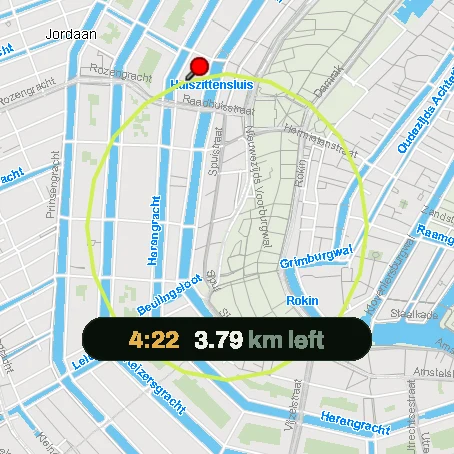
Easy, tempo, or long. From where you are standing. Route generation is live in the Netherlands and the United Kingdom.
A quieter loop on the easy day. Something flatter for the tempo. The long run keeps going.
The workout asked for 12 km. The loop is 12 km. You do not trim it on the map first.
Hotel, a new street, the usual start. The loop begins there.
The run still logs. It syncs when you have signal again.
Set a start point and a distance. This is the same route engine the app uses for every planned run.
Free route planner
Start point
Or tap the map to set where the run starts.
Loops are live in the Netherlands and the UK. Your start point is only used to build this loop. It is not stored.
The start point is your GPS position, or a point you pick on the map. The loop comes back to that same point, so there is no out-and-back and no second leg to plan.
When a plan asks for 12 km, the loop is built at 12 km. The length the engine actually found is shown before you go, so a loop that comes out a little short or long is never a surprise halfway.
Loops avoid busy roads unless you turn that off. You can also ask for a style (easy, tempo, or long), a surface (paved or unpaved), and flat or hilly ground.
Each start point and distance has several different loops behind it, scored on distance, quiet roads and turns. The best one comes first; ask for another and you get the next one rather than a small variation of the same streets.
In the Netherlands and the United Kingdom. Plans, coaching and run tracking work everywhere; loops are only generated inside those two countries for now.
Yes. The planner on this page needs no account. In the app, the free plan includes routes as well.
From this page, download the loop as a GPX file and import it into your watch or another app. In Runapt the loop is part of the planned session.
The planner on this page uses your start point only to build the loop and does not store it. In the app, privacy zones mask your runs around places like home whenever a run leaves the app, for example when you share or export it.
The run still records, and it syncs when you have signal again.
Download Runapt and build your first training week. The free plan has no time limit.
Or start on the web